
Agua
Agua

Rodo Casa
RodoLinks
RodoLinks is a bookmarks manager, that not only stores links to your websites, but also to your Windows apps, documents, music video, images and folders on your pc.
It has dynamic Link bars, that look a bit like the Windows taskbar, but dynamically show your last used Links in horizontal or vertical bars which can be placed everywhere on the screen.
Your frequently used Links are never more than one single click away. Opening a web page or app cannot be made faster.
To open Links that you use less frequently, click a button on the widget and a few letters of the Link you look for.

Click on a Links bar icon to open the Link

This is the widget on your desktop.
Click on one of the icons to show a window for the type of Link you search for: apps, websites, files or folders

When you click a widget icon, a window opens, containing all your Links of the wanted Link type.
You can browse the list or type a search word to find your Link
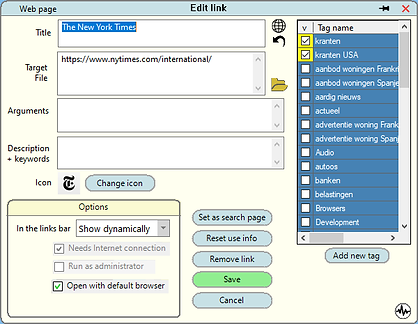
Long-click a Link in the list to edit its properties like name, description, icon, page address etc.
But there are more options, not available in any web browser's shortcut editor.
- Search best icon: Many websites contain several icons for the page. You can explore the web page to extract the best one.
- Click the tags you want to assign to the shortcut.
- If you use more than one web browser, you can select the browser that displays or handles the webpage best.
Options:
-
Import bookmarks from almost any web browser
-
Export Links in a format that can be read by most web browsers for Windows and Android
-
Scheduled backup and restore for bookmarks and program settings
-
Check for Internet connection
-
Select a non-default web browser for a bookmark
-
And a lot more . . . .
RodoLinks runs on almost any pc with Windows 10 or 11
-
This program is free to install and use
-
It doesn't contain ads
-
It doesn't collect your personal data
-
It is free from viruses and other malware
-
Made with pleasure for your pleasure